Plex AVOD Direct Playback — Partner Integration Guide¶
DRAFT — for partner feasibility review. This document describes a proposed integration and is subject to change. Please read it end-to-end and flag anything that is not implementable on your platform before we begin building. Field names, paths, and examples are indicative.
1. Introduction¶
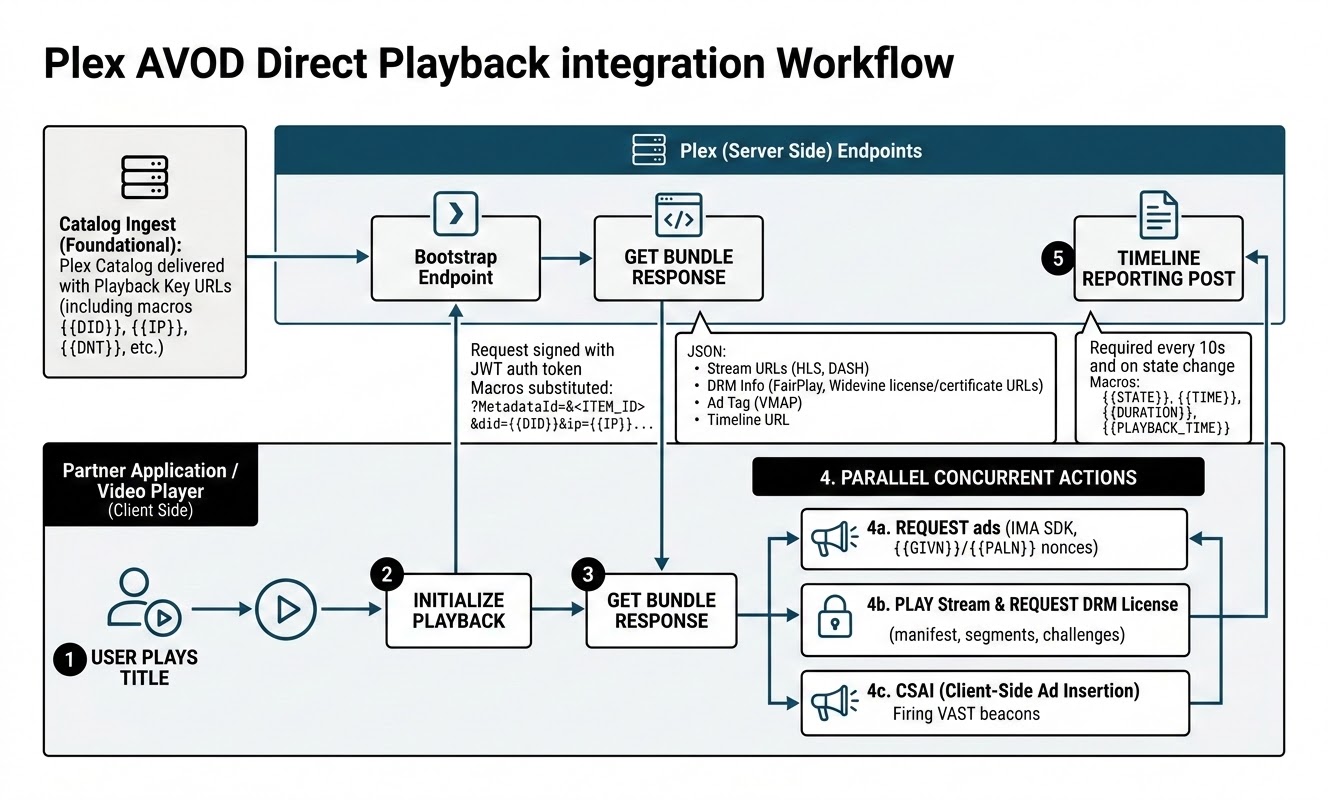
This guide describes how to play Plex ad-supported video-on-demand (AVOD) titles directly inside your own player, without launching the Plex app. Your application:
- Ingests a Plex catalog whose items carry a playback key (a URL) for each title.
- When a user starts a title, your player calls that key — the bootstrap endpoint — which returns a ready-to-use playback bundle: stream URLs, DRM information, an ad tag (VMAP), and a progress (timeline) reporting URL.
- Your player then plays the stream, inserts ads client-side, and reports progress to Plex.
You are responsible for playback, client-side ad insertion, and sending progress (timeline) events. Plex handles authentication, content rights, ad decisioning, and DRM licensing behind the endpoints.
2. Integration at a glance¶
3. Prerequisites¶
- Shared secret — the same secret you already use for the FAST direct-playback integration, used to sign requests (see §4). Keep it server-side, never ship it in the app binary.
- A player supporting HLS+FairPlay and/or DASH+Widevine (see §8).
- An ad SDK — we recommend the Google IMA SDK for client-side ad insertion (see §9).
4. Authentication¶
Every request to the bootstrap endpoint must be authenticated with a JSON Web Token (JWT) you generate and sign with your shared secret (the same secret as your FAST integration). Authentication is always required for this endpoint.
- Algorithm:
HS256(HMAC + your shared secret). - Payload: a single claim, the current time in Unix seconds:
- Validity: the
timestampmust be within the last 5 minutes. A small future skew (up to 60 seconds) is tolerated for drifting device clocks; anything further in the future is rejected. Generate a fresh token per request (or refresh at least every 5 minutes), and derive the timestamp from a synchronized clock. - Transport: send the token in the
Authorizationheader (with or without aBearerprefix), or fall back to atokenquery parameter:
Invalid, missing, or stale tokens are rejected with 403. The error message distinguishes
the failure: Invalid token signature. (wrong secret or corrupted token),
Invalid token - expired payload (timestamp older than 5 minutes),
Invalid token - missing or invalid timestamp (missing or non-numeric timestamp claim), and
Invalid token - timestamp is in the future (check device clock skew).
5. The catalog¶
Compared to the standard deeplink catalog, the AVOD direct-playback catalog changes one thing: each item's playback key points at the bootstrap endpoint instead of a Plex app deeplink.
Fetching the catalog¶
<PARTNER>is your Plex-assigned partner identifier — Plex gives you the exact value. You shouldn't need to assemble these URLs by hand: the catalog URL is provided to you, and each item's bootstrap URL comes prebaked in the catalog feed.- Auth is the
apiKeyquery parameter (the same key as your existing catalog integration); a missing or wrong key is rejected with401. - The response is a
302redirect to a time-limited signed URL. Follow it withGETonly — the signed URL rejectsHEADand other methods. - The catalog is regenerated roughly every 3 hours; poll on that cadence or slower.
Format & scale¶
The catalog is a single minified JSON file, {"metadata":[ … ]} — currently on the order
of 340 MB and ~118,000 items, with no pagination or chunking. Ingest it server-side with
a streaming JSON parser into your own store and serve your client applications from that
copy; do not parse the file in memory or ship it to devices.
Two practical notes for the ingest:
- The entire
metadataarray is on one line. Line-oriented "streaming" (read a line, parse a line — the usual trick for large JSON exports) degrades to loading the whole file; a character-level incremental (SAX-style) parser is required. - The signed download URL supports HTTP range requests (
206 Partial Content), so an interrupted ingest can resume from its last byte offset instead of restarting.
Item schema¶
The metadata array is flat: movies, shows, seasons, and episodes are sibling entries
linked by ids in series_info. Only movies and episodes are playable; show and season
entries are structural and carry an empty availabilities array. Gate playability on
type ∈ {movie, episode} — never on the mere presence of an availabilities array.
Because geo and window travel in availabilities, show/season rows derive them from their
episodes: surface a show wherever (and whenever) at least one of its episodes is playable.
The example below shows the item schema; its field values are illustrative and do not reflect any live title's actual licensing (for real test titles and their geo, see §14).
{
  "type": "movie",
  "id": "5d776f7e51dd69001fe54134",
  "titles": [{ "country": "US", "language": "en", "title": "Example Title" }],
  "descriptions": [{ "language": "en", "description": "…" }],
  "genres": ["Drama"],
  "release_date": "2016-02-07",
  "runtime": 122,
  "ratings": [{ "country": "US", "rating": "R", "rating_body": "MPAA" }],
  "images": [{ "type": "coverPoster", "url": "https://metadata-static.plex.tv/…", "width": 960, "height": 1440 }],
  "credits": [{ "person_name": "…", "role": "…", "type": "actor" }],
  "availabilities": [
    {
      "countries": ["CA", "US"],
      "available_starting": "2025-04-11T00:00:00.000Z",
      "available_ending": "9999-12-31T23:59:59.999Z",
      "audio_languages": ["en"],
      "subtitle_languages": ["en"],
      "delivery_method": "vod",
      "monetization_type": "ads",
      "quality": "hd",
      "url": "https://vod.provider.plex.tv/playback/<PARTNER>/bootstrap?metadataId=5d776f7e51dd69001fe54134&format=json&did={{DEVICE_ID}}&…"
    }
  ]
}
typeis one ofmovie | show | season | episode.series_infolinks the hierarchy: episodes carry{ show_id, season_id, season_number, episode_number }, seasons carry{ show_id, season_number, number_of_episodes }, shows carry noseries_info.- An item may carry multiple availabilities with different country sets and windows; pick the one matching the viewer.
titles/descriptionsare per-language arrays;imagesare typed (coverPosterfor posters,coverArtfor wide art);ratingsare per country.
Availability window & geo¶
Each playable item carries its availability window and allowed geographies. Your application must respect these when deciding what to surface:
- Availability window — start/end timestamps during which the title is playable.
- Geo — the countries in which the title is licensed.
Playback of a title outside its window or geo is refused at bootstrap with a
404(see §13); a geo change mid-session is refused with aterminationCode(see §11). Filtering your surfaced catalog to in-window, in-geo titles avoids presenting titles that will fail to play.
Playback key format¶
https://vod.provider.plex.tv/playback/<PARTNER>/bootstrap?metadataId=<ITEM_ID>
&format=json
&did={{DEVICE_ID}}
&dnt={{DNT}}
&ip={{IP}}
&app_version={{APP_VERSION}}
&app_bundle={{APP_BUNDLE}}
&app_store_url={{APP_STORE_URL}}
&device_make={{DEVICE_MAKE}}
&device_model={{DEVICE_MODEL}}
&h={{HEIGHT}}
&w={{WIDTH}}
&app_name={{APP_NAME}}
&domain={{DOMAIN}}
&iab_category={{IAB_CATEGORY}}
&user_agent={{USER_AGENT}}
&ifa_type={{IFA_TYPE}}
&us_privacy={{US_PRIVACY}}
&gdpr={{GDPR}}
&consent={{CONSENT}}
&cb={{CACHEBUSTER}}
×tamp={{TIMESTAMP}}
&country={{COUNTRY}}
&language={{LANGUAGE}}
&content_custom_1_param={{CONTENT_CUSTOM_1_PARAM}}
<ITEM_ID> is fixed per title. The {{…}} tokens are macros your player must replace at
runtime. The spellings are the standard macro names and are shared with the FAST direct-playback
integration, so one substitution map serves both.
Substitute by query-parameter name, not by token spelling. Treat any parameter whose value looks like
{{…}}as a macro slot and fill it based on the parameter name from the table in §6. This keeps your implementation robust if token capitalization ever differs between integrations.
6. Macro reference¶
| Query param | Macro | Required | Description |
|---|---|---|---|
did |
{{DEVICE_ID}} |
Recommended | Device advertising ID; absent when the user opts out of ad tracking |
dnt |
{{DNT}} |
No | Do-not-track flag (0 or 1) |
ip |
{{IP}} |
No | Viewer IP; forwarded to demand only — see the note below |
device_make |
{{DEVICE_MAKE}} |
No | Device manufacturer |
device_model |
{{DEVICE_MODEL}} |
No | Device model |
app_version |
{{APP_VERSION}} |
No | Your app version |
app_bundle |
{{APP_BUNDLE}} |
No | App bundle / package identifier |
app_store_url |
{{APP_STORE_URL}} |
No | App store listing URL; also identifies the device platform |
h |
{{HEIGHT}} |
No | Player viewport height in pixels |
w |
{{WIDTH}} |
No | Player viewport width in pixels |
app_name |
{{APP_NAME}} |
No | Your app's display name |
domain |
{{DOMAIN}} |
No | Your app's domain |
iab_category |
{{IAB_CATEGORY}} |
No | IAB category of the app content |
user_agent |
{{USER_AGENT}} |
No | Device user agent string |
ifa_type |
{{IFA_TYPE}} |
No | Type of the advertising ID in did (e.g. aaid, rida) |
us_privacy |
{{US_PRIVACY}} |
No | US privacy (CCPA) consent string |
gdpr |
{{GDPR}} |
No | 1 when the viewer is in the EU and consent applies |
consent |
{{CONSENT}} |
No | TCF consent string from your CMP |
cb |
{{CACHEBUSTER}} |
No | Random value; see the note on session-scoped values below |
timestamp |
{{TIMESTAMP}} |
No | Unix timestamp; see the note on session-scoped values below |
country |
{{COUNTRY}} |
No | ISO country code |
language |
{{LANGUAGE}} |
No | App or content language |
content_custom_1_param |
{{CONTENT_CUSTOM_1_PARAM}} |
No | A value of your choosing; see the note on session-scoped values below |
No macro is strictly required. Send did whenever the device exposes it — it improves ad
targeting and session continuity — but if the user has opted out of ad tracking (so the OS withholds
the advertising ID), simply omit it; Plex falls back to the request IP. Any macro you cannot supply
should be omitted or left empty rather than sent as an un-substituted {{…}} literal.
There is no OS macro. Plex infers the device platform from app_store_url, so send it even
though it is optional — without it we assume Android.
Ad macros are forwarded, not interpreted. Everything from app_name down is passed through to
your own demand tags as custom_<partner>_<name> (for example custom_tcl_app_name). Plex does not
use these values for its own ad requests — Plex inventory continues to carry Plex's app identity and
Plex's own consent signals.
cb, timestamp and content_custom_1_param are captured once per playback, at the moment you
call bootstrap (or tune), and are replayed on every ad request for that session. Treat them as
"session start", not as per-request values. On a FAST channel this means content_custom_1_param
stays fixed for the whole session — it does not follow programme changes.
ip is advisory. Plex determines geo and session identity from the source IP of the bootstrap
request itself (see Request origin & geo), never from this macro. The value is forwarded to
demand partners only.
7. Starting playback — the bootstrap request¶
GET https://vod.provider.plex.tv/playback/<PARTNER>/bootstrap?metadataId=<ITEM_ID>&format=json&did=…
with the Authorization header from §4 and the headers from
§12.
Request origin & geo¶
Plex derives the viewer's country from the source IP of the bootstrap request, so that IP must be
the end user's. Issue the request from the end-user's device wherever possible. If you must proxy it
through your own servers, set the X-Forwarded-For header to the end user's client IP so geo
resolves correctly — otherwise titles may be wrongly allowed or refused for the viewer's region.
(Geo is also re-checked mid-session — see §11.)
Response¶
{
  "drmEnabled": true,
  "streams": [
    {
      "protocol": "dash",
      "drm": "widevine",
      "manifestURL": "https://vod.provider.plex.tv/library/parts/<PART>-dash.mpd?…",
      "licenseURL": "https://vod.provider.plex.tv/library/parts/<PART>-dash/license?…"
    },
    {
      "protocol": "hls",
      "drm": "fairplay",
      "manifestURL": "https://vod.provider.plex.tv/library/parts/<PART>-hls.m3u8?…",
      "licenseURL": "https://vod.provider.plex.tv/library/parts/<PART>-hls/license?…",
      "certificateURL": "https://vod.provider.plex.tv/library/parts/<PART>-hls/certificate?…"
    }
  ],
  "ad": {
    "vmapURL": "https://vod.provider.plex.tv/vmap?…"
  },
  "timeline": {
    "url": "https://vod.provider.plex.tv/timeline?…&state={{STATE}}&time={{TIME}}&duration={{DURATION}}&playbackTime={{PLAYBACK_TIME}}",
    "intervalSeconds": 10
  },
  "metadata": {
    "title": "Example Title",
    "durationMs": 5400000
  },
  "tracks": {
    "audio": [
      { "languageCode": "en", "channels": 6, "default": true },
      { "languageCode": "es", "channels": 2 }
    ],
    "subtitles": [{ "languageCode": "eng", "label": "English" }]
  }
}
All URLs are ready to use as-is — the necessary authentication is already embedded. Do not modify them except to substitute the timeline macros (see §10) and to attach the ad nonce (see §9). Treat the URLs as opaque.
8. Playback: streams and DRM¶
The bundle returns one entry per supported protocol; pick the one your device supports best:
| Protocol | DRM | Notes |
|---|---|---|
| HLS | FairPlay | manifestURL, licenseURL, certificateURL |
| DASH | Widevine | manifestURL, licenseURL |
- Check
drmEnabledfirst. The top-leveldrmEnabledboolean tells you whether the returned streams are DRM-protected. When it isfalse, each stream carries onlyprotocol+manifestURL(play it in the clear); thedrm/licenseURL/certificateURLfields are absent. - Expect a mixed catalog. Clear and DRM-protected titles coexist in the same catalog (DRM
depends on the content licensor; only a minority of titles carry it). Per-title
drmEnabledbranching is core logic, not an edge case — an implementation tested only on clear titles will fail on DRM ones, and vice versa. - Use DRM whenever
drmEnabledistrue. Each stream entry'sdrmfield names its scheme (widevine/fairplay); you must play it through DRM: load the manifest, then satisfy the license challenge against the entry'slicenseURL. For FairPlay, fetch the application certificate fromcertificateURLfirst. Use the license/certificate URLs from the bundle — do not construct your own. - No quality gating by security level. AVOD licenses do not restrict resolution or enforce output protection based on the device's DRM security level — a Widevine L3 device receives the same full-quality streams as an L1 device, and playback is not blocked on missing HDCP.
- Codecs: video H.264/AVC, audio AAC, fMP4 segments; subtitles in WebVTT, SRT, or ASS. Exact profiles/levels will be finalized before launch.
- Track selection: the
tracksblock lists available audio and subtitle options for building your selection UI; the actual tracks are carried in the manifest.languageCodeis served as stored — audio is typically ISO 639-1 (en) while subtitles are ISO 639-2 (eng); treat the manifest as the source of truth and don't join these values against each other or the catalog's*_languagesfields. - HLS packaging is CBCS and advertises both DRM systems. HLS variant playlists carry two
EXT-X-KEYtags — a Widevine one (KEYFORMAT="urn:uuid:edef8ba9-…") and the FairPlay one (KEYFORMAT="com.apple.streamingkeydelivery"). Select the FairPlay key format and ignore the Widevine tag; do not assert a single key system per playlist.
FairPlay license exchange¶
FairPlay leaves the license transport to the key server, so these two facts cannot be assumed
from the HLS/FairPlay specs. The key URI in the manifest looks like
skd://drmtoday?assetId=<uuid>&keyId=<hex>:
- Content identifier: the entire
skd://URI, UTF-8 encoded — do not parse outassetIdorkeyId. - License request (against the stream's
licenseURL):POSTwithContent-Type: application/x-www-form-urlencodedand bodyspc=<base64-encoded SPC>(URL-encoded, no other parameters). The response is the CKC as raw binary (application/octet-stream) — do not base64-decode it.
certificateURL returns the application certificate as DER X.509.
9. Ads (client-side insertion)¶
Plex AVOD uses client-side ad insertion (CSAI) — your player fetches the ad schedule and inserts ads around the content. We recommend the Google IMA SDK.
- The bundle's
ad.vmapURLreturns a VMAP document describing the ad breaks (pre-roll and any mid-rolls). Point your ad SDK at this URL. - The ad-nonce macros are on
ad.vmapURLitself — the URL ends in…&givn={{GIVN}}&paln={{PALN}}. Substitute the nonce your ad SDK generates (IMA and PAL produce the same nonce value; fill both parameters with it) before handing the URL to the SDK. If you cannot generate a nonce, send both parameters empty (givn=&paln=) — do not leave the{{…}}literals in place. Supplying the nonce materially improves ad fill; without it, ads still serve but fill is reduced. - Ad-break boundary events (IMA): on tvOS,
AD_BREAK_STARTED/AD_BREAK_ENDEDare not emitted for VMAP pre-rolls — drive break boundaries (and the §10 ad-break timeline semantics) fromadsManagerDidRequestContentPause/…ContentResumeinstead. On Android, Media3's IMA extension handles this implicitly:contentPosition/contentDurationalready exclude ad periods. - Your player (or the IMA SDK) is responsible for firing the impression and tracking beacons in the returned VAST. Accurate ad playback and signalling is a contractual requirement of the integration.
10. Timeline (progress) reporting¶
This is required. Plex derives all playback and monetization metrics for direct-playback sessions from your timeline events — there are no other client-side metrics in this integration. Under-reporting timelines means under-counted (and under-paid) playback.
- Send each timeline event as an HTTP
GETto the substitutedtimeline.url, everyintervalSeconds(10s) during playback and on state changes (start, pause, resume, buffering began, buffering ended, stop).POSTis not supported and returns404. - The
timeline.urlis self-authenticating — the necessary token is pre-embedded. Do not send anAuthorizationheader or build JWT refresh into the reporting loop. - Substitute these macros on each call:
| Macro | Value |
|---|---|
{{STATE}} |
playing, paused, buffering, or stopped |
{{TIME}} |
Current position within the content (the media playhead), in milliseconds |
{{DURATION}} |
Total content duration, in milliseconds |
{{PLAYBACK_TIME}} |
Elapsed time the user has actually been playing (the player's playback clock), in milliseconds |
TIME and PLAYBACK_TIME differ once a session isn't a clean linear play: TIME tracks where the
playhead is in the content, while PLAYBACK_TIME accumulates real watch time and therefore diverges
after pauses, seeks, or ad breaks. Both are required. PLAYBACK_TIME is what our provider
watch-time metrics are computed from — omitting it degrades those metrics (they fall back to a
playhead/wall-clock estimate that over- or under-counts) for any session with a pause, seek, or ad.
- During ad breaks, keep reporting. Continue the 10-second cadence through every ad break,
with
STATE=pausedandTIMEfrozen at the content position where the break started, whilePLAYBACK_TIMEkeeps accumulating (ad time counts toward the playback clock). This mirrors what Plex's own players send and is what our monetization metrics expect — stopping the clock during ads under-reports watch time by the full ad-break duration. - After a seek,
TIMEjumps to the new playhead position whilePLAYBACK_TIMEcontinues uninterrupted; the two values are expected to diverge. - Buffering is a state you must also leave. Report
STATE=bufferingwhen playback stalls, and reportplayingagain as soon as it recovers — the recovery transition is easy to miss, and an implementation that never exitsbufferingunder-reports the entire rest of the session. While buffering,TIMEholds still andPLAYBACK_TIMEfreezes (unlike ad breaks, the viewer is not watching anything). A stall-and-recover sequence looks like: - Everything else in the URL is pre-filled; do not alter it.
- Inspect every response — it may instruct you to stop (see §11).
This is the most intricate part of the integration and the easiest to get wrong; please budget for it.
11. Playback termination¶
A /timeline response may instruct you to stop playback. When the response contains a
terminationCode, halt playback and surface the accompanying terminationText to the user.
{
  "MediaContainer": {
    "playbackState": "ignore",
    "terminationCode": 2013,
    "terminationText": "Content is unavailable in your country."
  }
}
terminationCode |
Meaning | Expected player behavior |
|---|---|---|
2013 |
Content not available in the user's country, or the connection was flagged as a VPN/proxy | Stop playback, show terminationText |
2008 |
Playback has been paused for more than 1 hour; the session has ended | Stop playback, show terminationText |
If no terminationCode is present, continue playback normally. A non-terminating response
requires no action: its other fields (playbackState, viewOffset, …) are server-side
bookkeeping whose values vary with playback position and may change — they are not part of
the partner contract, so do not parse or branch on them.
Geo/window refusals. The window is checked at bootstrap only: a title outside the
viewer's geo or availability window returns 404 with an explanatory message (see
§13) — map that to your "not available in your region" UX.
Mid-session, terminationCode 2013 covers a geo change or a connection flagged as
VPN/proxy after playback started; a window that expires mid-session does not interrupt an
in-progress session.
12. Request headers and parameters¶
For the bootstrap request, the only required header is Authorization (the signed JWT from
§4). The device details Plex needs are supplied through the query macros in
§6; you do not need to send any additional X-Plex-* headers. All other
URLs in the bundle (streams, license, timeline.url, ad.vmapURL) are self-authenticating
and carry no auth headers of their own (the FairPlay license POST still needs its
Content-Type — see §8).
Tracking IDs are managed by Plex. Every identifier needed to correlate the ad and timeline
events of a playback is minted by Plex at bootstrap time and comes pre-embedded in the URLs
of the bundle (ad.vmapURL, timeline.url). Do not generate or send playback/session
identifiers of your own — there is nothing for you to manage.
13. Error handling¶
| Status | Meaning |
|---|---|
400 |
Unidentifiable request (no did and no client IP), or invalid metadataId |
403 |
Missing / invalid / expired auth token |
404 |
Title not found or not currently playable |
Error bodies are JSON, wrapped in an Error object — the message is the explanation to
surface or log (it is the only detail on a refusal, e.g. a geo-restricted title). The JSON
format is selected by the format=json parameter prebaked into your playback key; include it
if you ever construct a bootstrap request manually:
{
  "Error": {
    "error": "Not Found",
    "message": "No playable AVOD availability for this title in this region",
    "statusCode": 404
  }
}
For playback-time refusals (geo/availability), see §11.
14. Testing and support¶
- Reuse the shared secret from your existing FAST direct-playback integration — no new secret is issued for AVOD.
- Plex will provide a sample catalog and a set of test titles. The catalog itself carries no
DRM indicator (
drmEnabledexists only in the bootstrap response, and only a minority of titles are DRM-protected), so use the supplied DRM titles rather than probing for your own — and note each test title's licensed countries, since a title outside your test egress geo returns the §13404rather than a bundle. Current test titles (licenses shift; verify with a bootstrap call before relying on them):
metadataId |
Title | DRM | Notes |
|---|---|---|---|
5d776f7e51dd69001fe54134 |
#OntheShouldersofGiants | no (clear) | licensed worldwide |
5d77686a594b2b001e68b695 |
The Graduate | yes | 7 countries incl. US; not GB |
5d7768b10ab2440020071ca3 |
Goblin | yes | GB-playable |
- Direct integration questions to your Plex partner contact.
15. Open items for partner feedback¶
Please confirm feasibility of the following on your platform:
- Client-side ad insertion via the IMA SDK, including nonce (
{{GIVN}}/{{PALN}}) generation. - 10-second timeline reporting with the required state/time macros, and honoring
terminationCode. - HLS+FairPlay and/or DASH+Widevine playback with the license/certificate flow described.
- Signing requests with the shared secret (JWT, HS256, 5-minute validity).
Draft — © Plex. Shared for partner feasibility review; contents subject to change.